CIEM & AI-SPM
CIEM & AI-SPM — Identity Privilege Escalation + AI Service Posture
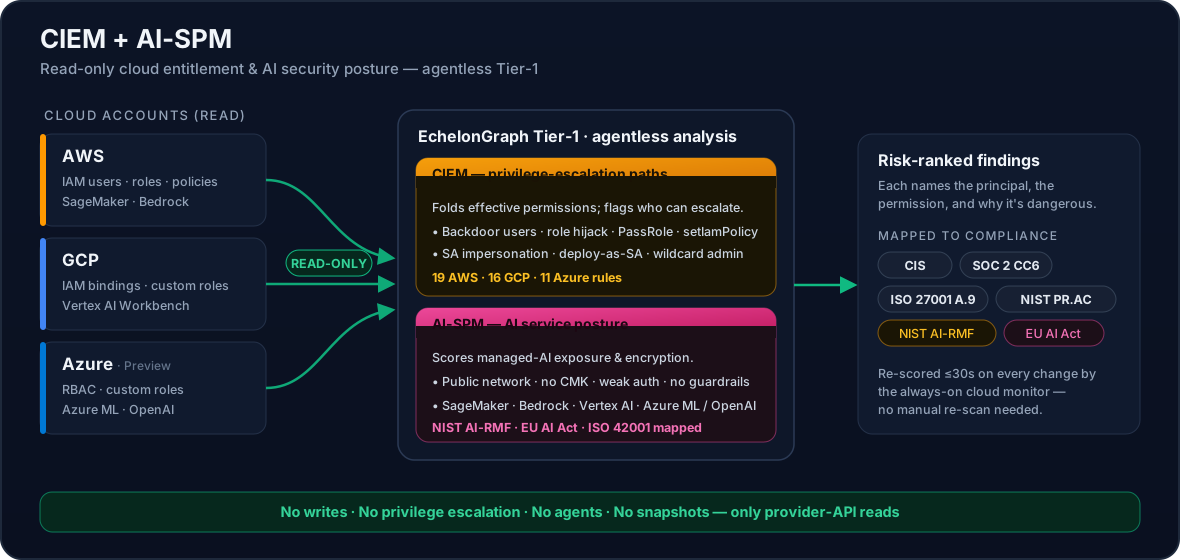
EchelonGraph adds two read-only capabilities on top of its agentless cloud scanner:
- CIEM (Cloud Infrastructure Entitlement Management) — finds privilege-escalation paths and over-privileged identities in AWS IAM, GCP IAM, and Azure RBAC.
- AI-SPM (AI Security Posture Management) — checks the security posture of managed AI services: Amazon SageMaker, Amazon Bedrock, Google Vertex AI Workbench, Azure Machine Learning, and Azure OpenAI.
Both are 100% read-only. EchelonGraph never creates, modifies, deletes, or escalates anything in your cloud — it only reads configuration through provider APIs. See Cloud access setup for the exact IAM permissions.
CIEM — Cloud Infrastructure Entitlement Management
Misconfigured identities are the number-one cloud attack path. A single over-privileged role or service account lets an attacker who lands anywhere pivot toward full account control. CIEM maps effective permissions and flags the identities that can escalate — before an attacker chains them.
What CIEM detects on AWS (19 rules, AWS-CIEM-001 to 019)
EchelonGraph folds IAM users, roles, and attached + inline policy documents into an effective-permission set and flags principals that can escalate. Representative checks:
- Set a new default policy version to widen their own access
- Use PassRole to a compute service (Lambda / EC2 / Glue) to run as a more-privileged role
- Create access keys or console passwords for another principal
- Hold wildcard actions and wildcard resources (Action '*' on Resource '*')
- Hijack an existing Lambda by overwriting its code to run as that function's role
- Read every Secrets Manager secret, SSM parameter, or KMS-encrypted blob — broad data-plane credential access
What CIEM detects on GCP (16 rules, GCP-CIEM-001 to 016)
EchelonGraph reads the project IAM policy and custom-role definitions. Representative checks:
- Public IAM bindings (allUsers / allAuthenticatedUsers)
- Service-account impersonation (Token Creator, Workload Identity User)
- setIamPolicy holders (Security Admin / Project IAM Admin) who can grant themselves any role
- Custom roles whose permissions confer privilege escalation (setIamPolicy, actAs, getAccessToken, roles.update)
- The default Compute / App Engine service account holding privilege-escalation roles — the most common GCP escalation foothold
- Deploy-as-service-account vectors — Cloud Build, Deployment Manager, Dataproc, Composer, or Dataflow run caller code as a privileged service account
> Google-managed service agents — which legitimately hold broad roles by design — are automatically suppressed, so you only see findings on your identities, not noise.
What CIEM detects on Azure (11 rules, AZ-CIEM-001 to 011) — Preview
EchelonGraph reads Azure RBAC role assignments and custom-role definitions (via Azure Resource Graph). Representative checks:
- Owner assigned at subscription or management-group scope — full control including role assignment
- User Access Administrator — can grant any role (direct privilege escalation)
- Role Based Access Control Administrator — can grant any role
- Contributor at subscription or management-group scope — manage-everything blast radius
- Privileged roles held by service principals (non-human identities) or orphaned / unknown principals
- Custom roles with
*wildcard actions orMicrosoft.Authorization/*grant-any-role permissions
> Live (with a caveat): as of 28 Jul 2026 the Azure CIEM + AI-SPM rules are validated against a real Azure subscription — role assignments, managed identities and Cognitive Services / Azure OpenAI accounts are collected end-to-end, and detections were confirmed firing against resources we deliberately misconfigured to test them. The managed-database collectors previously listed here as unproven — MySQL, PostgreSQL, Cosmos DB, Key Vault and Container Instances — were exercised against real provisioned instances on 29 Jul 2026 and are now proven live. Azure SQL is the one collector still without a live fixture, so we continue not to claim it. We list that distinction rather than rounding it up to "Live".
Why it matters
Every CIEM finding carries a risk score and maps to access-control requirements across CIS, SOC 2 (CC6), ISO 27001 (A.9), and NIST (PR.AC). It tells you which principal, which permission, and why it is dangerous — not generic boilerplate.
AI-SPM — AI Security Posture Management
As teams ship AI features, the managed AI services behind them become a new — and often unmonitored — attack surface. AI-SPM scores the posture of those services and pairs it with EchelonGraph's AI-compliance frameworks (NIST AI-RMF, EU AI Act, ISO 42001, MITRE ATLAS, OWASP LLM Top 10).
What AI-SPM checks on AWS
Amazon SageMaker notebooks (AWS-AISPM-001 to 003):
- Notebook with direct internet access — data-exfiltration / exposure risk
- Notebook with root access enabled
- Notebook storage not encrypted with a customer-managed KMS key
Amazon Bedrock (AWS-AISPM-004 to 005) — evaluated only when Bedrock is actually in use:
- Model-invocation logging disabled — no audit trail of genAI prompts and responses
- No guardrails configured — prompt-injection and unsafe-output controls absent
All checks are read-only (sagemaker List/Describe, bedrock Get/List).
What AI-SPM checks on GCP
Google Vertex AI Workbench notebooks (GCP-AISPM-001 to 004) — covers both current Workbench Instances and legacy User-Managed Notebooks:
- Notebook with a public IP address — directly reachable from the internet
- Boot/data disk not encrypted with a customer-managed key (CMEK) — relies on Google-managed keys only
- Shielded VM disabled — no Secure Boot, vTPM, or integrity monitoring
- Direct (non-proxied) access — bypasses the Vertex managed access proxy
All checks are read-only (notebooks.instances.list).
What AI-SPM checks on Azure — Preview
Azure Machine Learning workspaces (AZ-AISPM-001 to 003):
- Workspace with public network access enabled
- Workspace not encrypted with a customer-managed key (CMK)
- Workspace not flagged high-business-impact (HBI) — weaker data-handling guarantees
Azure OpenAI / Cognitive Services (AZ-AISPM-004 to 006):
- Account with public network access (no private endpoint / network-ACL deny)
- Account allows local (key-based) authentication instead of Microsoft Entra ID only
- Account not encrypted with a customer-managed key (CMK)
All checks are read-only (Azure Resource Graph) and covered by the Azure Reader role.
Coverage at a glance
| Capability | AWS | GCP | Azure |
|---|---|---|---|
| CIEM — IAM privilege escalation | Live | Live | Preview |
| AI-SPM — managed AI service posture | Live (SageMaker, Bedrock) | Live (Vertex AI) | Preview (Azure ML, OpenAI) |
> Live = validated against real cloud accounts. Preview = shipped + unit-tested and runs for any connected subscription, with live-environment validation in progress.
Getting it running
- Connect the cloud account using the read-only permissions in Cloud access setup — they already cover the CIEM IAM-policy reads and the AI-SPM actions.
- Run a scan. CIEM and AI-SPM findings appear in your dashboard alongside misconfiguration and CVE findings, ranked by risk score.
Want the full rule list for your clouds, or help reading these findings alongside the rest of your posture? Talk to us.